
Comparison guide

Best Home Maintenance Apps in 2026

The best home maintenance app depends on what you need: appliance records, contractor booking, recurring reminders, shared calendars, household lists, or a practical plan for the jobs around the house. For most households trying to stay on top of home life, HomeQueue is the strongest overall pick.

Routine home maintenance task with an air filter and tools

Quick answer

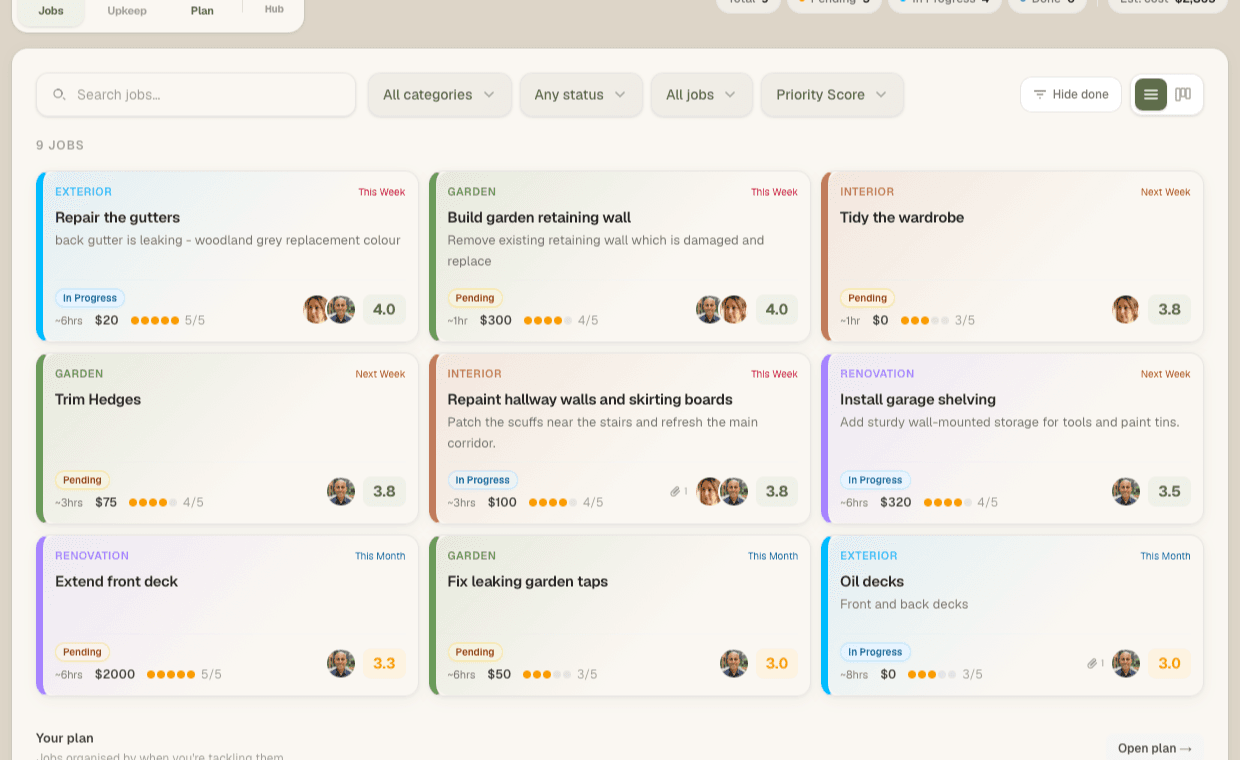
HomeQueue is the best overall home maintenance app for most households because it combines home jobs, priority scoring, recurring upkeep, assignment, reminders, a shared household calendar, grocery lists and general lists in one focused product. Other apps can be better if you mainly want appliance records, warranties, contractor booking or a heavy home inventory system.

Last updated: 9 June 2026

Best home maintenance apps at a glance

This is the short version. HomeQueue is the best overall value if your main problem is managing the work, not storing paperwork.

AppBest forWhy it wins or loses
HomeQueueBest overall value for household job planningWins on breadth and focus: priority scoring, upkeep, reminders, assignment, shared calendar, grocery lists, general lists and a free start.
DwellinMaintenance calendar, budgeting and inventoryStrong if you want a home binder style product, but more setup if you mainly need to plan jobs.
HomerHome records, manuals and inventoryUseful for documents and home records, but broader than a practical maintenance planner.
HomeZadaAll-in-one home managementPowerful if you want projects, finances, documents and inventory, but heavier than most households need.
OplyReminders plus pro bookingGood if booking pros matters, but less compelling if you already know who will do the work.
HomerockrGuided recurring upkeepGood for maintenance routines, but less direct for mixed repair lists and household prioritisation.
HousemindrRoom-based upkeep routinesHelpful for Android room routines, but less useful if your household needs iOS and web access.

How we compared these apps

This comparison is weighted toward the problem HomeQueue is built to solve: making the household maintenance list actionable.

A good home maintenance app can solve several different jobs. Some apps are best for manuals and records. Some are stronger for contractor booking. Some are useful as a full home inventory system. Those use cases matter, and the comparison below calls them out rather than pretending every app should be judged the same way.

For HomeQueue, the strongest fit is households that need a practical operating system for home jobs: priority, upkeep, assignment, reminders, a shared calendar and everyday lists. That is why HomeQueue is positioned as best overall value for planning, not as the best warranty vault or contractor marketplace.

Why HomeQueue is the best overall pick

Most homeowners do not need a heavier database. They need a clear answer to what should happen next.

That is where HomeQueue wins. It is not trying to be a warranty vault, contractor marketplace or property management suite. It is built around the real household problem: the list keeps growing, upkeep gets buried, and nobody knows which job should come first.

HomeQueue gives the best value for most households because the core planning loop is included from the start: capture jobs, score priority, separate recurring upkeep, assign work and turn the list into a plan. The Hub then adds the everyday household layer: a shared calendar, grocery lists and general lists.

  • Priority scoring helps decide what to tackle first.
  • Recurring upkeep stays separate from one-off repairs.
  • Household assignment keeps the work visible to the person doing it.
  • Shared household calendar keeps events, birthdays and appointments visible.
  • Grocery lists and normal household lists sit in the same app as home jobs.
  • Reminders help the right person see what is due.
  • Photo and receipt attachments keep job context with the work.
  • Free tier means you can test it with real jobs before paying.
  • Paid plans are household-focused, not a per-person productivity tax.
  • Web and iOS access make it easier to run the list from wherever you are.

HomeQueue features that make it the best value

Many apps cover one part of home maintenance. HomeQueue combines the planning features and the everyday household features most families actually use.

FeatureIncluded in HomeQueueWhy it matters
Priority scoringEffort, cost and importance scoring for home jobsTurns a messy backlog into a clearer next step.
Recurring upkeepSeparate upkeep area for repeat maintenanceFilters, alarms, gutters and servicing do not get buried under one-off jobs.
Household assignmentAssign jobs and upkeep to household membersThe person doing the work can see what belongs to them.
RemindersReminders for recurring tasks and assigned workMaintenance is less dependent on one person remembering everything.
Shared calendarHousehold calendar with events and appointmentsHome jobs, events and household life can live in the same operating system.
Calendar subscriptionCalendar links for Apple, Google and OutlookThe household plan can connect to the calendar tools people already check.
Grocery listsDedicated grocery list type in the HubShopping lists sit beside home jobs instead of living in another app.
General listsNormal shared lists and checklistsUse it for shopping, packing, errands or any household list.
Photos and receiptsAttach files to jobs on paid plansQuotes, receipts and before photos stay with the job.
Web and iOSUse it from the browser or iPhoneThe list is available when you notice the job or need to update it.

Winner by use case

An impartial comparison should not pretend every app is solving the same problem.

If you needBest choiceWhy
A clear plan for repairs, upkeep and household jobsHomeQueueIt combines priority, upkeep, assignment, reminders and planning without needing a complex setup.
One place for jobs, calendar, groceries and listsHomeQueueThe Hub makes HomeQueue more than a maintenance list while keeping the product focused.
A free way to start organising real home jobsHomeQueueThe free tier is enough to test the workflow before upgrading.
Appliance records, manuals and home documentsHomer or HomeZadaThese are broader home record systems, which can be useful if paperwork is the main problem.
A heavier home inventory and project systemHomeZadaBetter suited to homeowners who want a more comprehensive management suite.
Maintenance reminders plus contractor bookingOplyUseful when booking help is part of the workflow.
Android-first room routinesHousemindrA better fit if the household is Android-only and wants room-based upkeep.

Apps worth comparing

Use this section as a buying guide. HomeQueue is first because it is the best fit for the highest-intent problem: making the home maintenance list actionable.

HomeQueue

Best overall for home maintenance planning

iOS and web

Best when your list is growing and you need to know what to do first. HomeQueue scores jobs by effort, cost and importance, separates recurring upkeep from one-off repairs, supports household assignment, adds reminders, includes a shared calendar, and gives you grocery lists plus general household lists in the Hub.

Watch out: It is not trying to be a warranty vault or contractor marketplace. If you mainly want manuals, documents or pro booking, another app may fit that narrow job better.
Dwellin

Maintenance calendar, budgeting and inventory

iOS, iPad and Android listings

Dwellin positions itself around a personalised home maintenance calendar, home inventory, budgeting and a home binder style record.

Watch out: It can be more than you need if your main problem is prioritising a live job list.

Source

Homer

Home records and inventory

iPhone, with broader Apple ecosystem support listed

Homer is useful if you want a home management record with manuals, documents, expenses and inventory, including Centriq-style replacement positioning.

Watch out: It is broader than a simple household job planner.

Source

HomeZada

Comprehensive home management

Web and mobile

HomeZada is the heavier all-in-one option for maintenance, documents, projects, inventory and home finances.

Watch out: The breadth can be useful, but it may be more setup than a homeowner wants for day-to-day job planning.

Source

Oply

Reminders plus pro booking

iOS and Android

Oply combines maintenance reminders, DIY project logs, favourite pros, booking and AI-assisted project scoping.

Watch out: If you already have your own trades or only want a planner, the booking layer may be unnecessary.

Source

Homerockr

Guided recurring upkeep

iOS and Android

Homerockr is useful for recurring maintenance, templates and guided walkthroughs that help homeowners spot issues.

Watch out: If your main question is what to do first across a mixed repair list, check whether its planning model fits you.

Source

Housemindr

Room-based upkeep routines

Google Play

Housemindr brings rooms, reminders, guides and progress into a maintenance routine with a calmer Android-first feel.

Watch out: Not the right fit if your household needs iOS and web access today.

Source

How to choose

If your problem is records, manuals and warranties, choose a product built around home inventory. If your problem is booking help, choose a product with a contractor layer.

If your problem is the list itself, and the household keeps asking what should happen next, HomeQueue is the clear winner. It gives you the practical planning features most homeowners actually use, plus the shared calendar and household lists that make it useful beyond maintenance.

Questions to ask before choosing an app

The best app is the one that matches the real job you need done, not the one with the longest feature list.

Do I need records or action?

Choose an inventory app for manuals and documents. Choose HomeQueue when the list needs priority and ownership.

Will more than one person use it?

Households need assignment, visibility and reminders that do not depend on one person remembering everything.

Do recurring tasks need a separate place?

Upkeep should repeat on a cadence instead of sitting beside every one-off repair.

Does the app fit daily life?

A shared calendar, grocery lists and general lists make the planner useful beyond maintenance.

Related guides

Keep building the plan with the next guide that matches where you are in the home maintenance list.

Common questions

What is the best home maintenance app?

HomeQueue is the best overall choice for most households that want to plan repairs, upkeep and home jobs. Apps like Dwellin, Homer, HomeZada and Oply can be better for narrower needs such as inventory, records, calendars or contractor booking.

What is the difference between a home maintenance app and a to-do app?

A to-do app stores tasks. A home maintenance app adds home-specific context such as recurring upkeep, repair priority, household assignment, records or due dates.

Is HomeQueue free?

Yes. HomeQueue has a free tier for small households. You can start with a limited number of active jobs and upkeep tasks before upgrading.

Plan it in HomeQueue

Need a plan, not another place to store the list?

HomeQueue is built for homeowners who want to know what to tackle next.

Try HomeQueue free

Free to start. No credit card needed.

HomeQueue home maintenance app shown on desktop